===============================================================================
                       WinIDS v3.0 Deployment Framework
                  EveBox Standalone Console — SQLite Edition
                              (Add-On Package)
                             Installation Guide
                Copyright © 2026 WinSnort.com | Michael Steele
===============================================================================

ABOUT THIS FILE
-------------------------------------------------------------------------------

This package provides an automated deployment framework for adding the EveBox
Web Console and embedded SQLite storage backend to an existing WinIDS / Suricata
installation.

    • EveBox Web Interface (Port 5636)
    • Embedded SQLite Database Engine
    • Live EVE JSON Ingestion Pipeline
    • Automated Windows Service Management & Recovery

===============================================================================
PHASE I: PRE-DEPLOYMENT SPECIFICATIONS
===============================================================================

TARGET ENVIRONMENT
    • Windows 10 / Windows 11 (64-bit) or Windows Server (2016–2025) (64-bit)
    • Existing active WinIDS / Suricata installation (generating eve.json)
    • Local Administrator privileges required
    • Active Internet connection recommended (for initial binary retrieval)

DEPLOYMENT MODEL
    EveBox Console Add-On running an embedded SQLite database engine to ingest
    and visualize Suricata event telemetry.

PACKAGE SECURITY & INTEGRITY
    • Archive Password : w1nsn03t.c0m
    • SHA-1 Hash       : D8FD81E2079A2FF31024A156CA60F8EE10D7CA6C

ARCHIVE HANDLING
    • Extract the full ZIP archive before running setup. DO NOT run
      installers directly from inside the ZIP file.
    • Preserve all directory structures contained within the archive.

IMPORTANT NOTICE
    This package registers background Windows Services and configures local firewall
    rules to serve the EveBox web UI. Ensure your core Suricata engine is already
    installed and actively producing `eve.json` logs before proceeding.

===============================================================================
PHASE II: PACKAGE CONTENTS
===============================================================================

  EveBox-SQLite-AddOn-Installer.exe
      Automated EveBox & SQLite deployment utility.

  EveBox-Console-Cleanup-Restore.exe
      Uninstall and disaster recovery utility for the EveBox Add-On components.

===============================================================================
PHASE III: INSTALLATION PROCEDURE
===============================================================================

STEP 1: EXTRACT PACKAGE
    Extract the complete production ZIP archive to a dedicated folder.

    Example: D:\WinIDS-Addons\EveBox-SQLite
    (Do not rename or remove files prior to setup.)

STEP 2: RUN ADD-ON INSTALLER
    Right-click 'EveBox-SQLite-AddOn-Installer.exe' -> Select "Run as administrator"
    The framework will validate your environment, provision the SQLite database,
    register the EveBox service, and hook into your Suricata `eve.json` log stream.

===============================================================================
PHASE IV: ARCHITECTURE OVERVIEW & RESILIENCY
===============================================================================

AUTOMATED PIPELINE
    • DATABASE INITIALIZATION: Provisions and optimizes the embedded SQLite
      engine for high-throughput event storage and local querying out of the box.
    • SERVICE REGISTRATION   : Configures EveBox as a native Windows Service
      via NSSM with automatic recovery and restart flags.
    • EVE INGESTION PIPELINE : Establishes live monitoring of the Suricata
      eve.json output stream to ingest, index, and surface alert telemetry
      directly into the SQLite backend.
    • WEB INTERFACE BINDING  : Deploys and exposes the lightweight EveBox web
      UI on port 5636 for local or network threat analysis.

COMPONENT STACK
    • EVEBOX: Web-based alert management and threat analysis console.
    • SQLITE: Embedded high-performance transactional database backend.
    • NSSM: Service wrapper managing background execution and fault recovery.
    • EVE JSON: Structured event log source stream generated by Suricata.

===============================================================================
PHASE V: POST-DEPLOYMENT MANAGEMENT & ACCESS
===============================================================================

CONSOLE ACCESS
    • Browser access: `http://localhost:5636` (or via the generated Desktop/Start Menu shortcut).
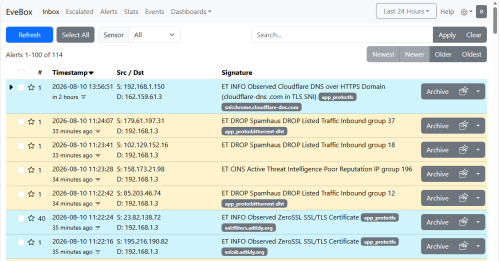
    • Features an inbox-style alert triage dashboard, event search, and telemetry graph views.

SYSTEM REBOOT
    • Recommended (optional). Refreshes environment PATH variables and verifies
      the EveBox Windows Service auto-start condition.

===============================================================================
PHASE VI: TROUBLESHOOTING
===============================================================================

1. DEPENDENCY DOWNLOAD FAILS
   - Review installer console output and log files.
   - Verify Internet connectivity and check write permissions on temporary directories.
   - Re-run installer (cached downloads will automatically be reused).

2. EVEBOX CONSOLE UNREACHABLE
   - Confirm the EveBox service state in `services.msc`.
   - Verify local port binding status at `http://localhost:5636`.
   - Check Windows Firewall rules to ensure port 5636 is allowed locally.

3. EVEBOX DISPLAYS NO EVENTS
   - Confirm the core Suricata service is running and generating fresh `eve.json` data.
   - Verify the `eve.json` file path configured during setup is valid and accessible.
   - Ensure read permissions are granted on the target Suricata log directory.

===============================================================================
FINAL DEPLOYMENT CHECKLIST
===============================================================================
[ ] SHA-1 hash verified before extraction
[ ] Archive extracted to local directory using archive password
[ ] Add-On installer executed with Administrator privileges
[ ] EveBox service active and bound to port 5636
[ ] Local dashboard accessible at http://localhost:5636
[ ] EveBox ingesting live alerts from Suricata `eve.json`
[ ] Desktop and Start Menu shortcuts generated
[ ] System reboot performed (recommended)

===============================================================================
TECHNICAL DOCUMENTATION & SUPPORT
===============================================================================
WinSnort.com
Website: https://winsnort.com
Maintainer: Michael Steele
===============================================================================