
5 files
-
By Morpheus
===============================================================================
WinIDS v3.0 Deployment Framework - Standalone Sensor Install Guide
Copyright © 2026 WinSnort.com | Michael Steele
===============================================================================
OPERATIONAL OVERVIEW
This package contains a specialized deployment framework for the Windows
Intrusion Detection System (WinIDS). It is engineered for high-performance
installations on Windows 10/11 and Windows Server (2016-2025) 64-bit.
-------------------------------------------------------------------------------
PHASE I: PRE-DEPLOYMENT SPECIFICATIONS
-------------------------------------------------------------------------------
* Target Environment : Optimized for clean OS installations. * Archive Integrity : Extract all package contents to a dedicated directory. * Archive Security : w1nsn03t.c0m -------------------------------------------------------------------------------
PHASE II: PARAMETER CONFIGURATION
-------------------------------------------------------------------------------
Before execution, define the operational environment within 'config.conf'
using Notepad editor. Configure the following critical variables:
$TempDir = "" # Directory for temporary installation and download files (e.g., "D:\files") $WinIDSRoot = "" # The primary home directory for the WinIDS installation (e.g., "D:\home") $Oinkcode = "" # Your 40-character Snort.org Oinkcode; required for automated rule updates $SensorName = "" # Unique Node Sensor name (e.g., "NodeName") $EnableAllRules = $true # Set to $false to disable rule testing and high-volume event logging $EnableRestorePoint = $true # Set to $false to skip System Restore point creation (Workstation only) $SnortUser = "snort" # Master Host ALERT Database Username $SnortPass = "l0gg3r" # Master Host ALERT Database Password $RootUser = "root" # Master Host (Root) MySQL/PostgreSQL Database Username $RootPass = "d1ngd0ng" # Master Host (Root) MySQL/PostgreSQL Database Password SECURITY RECOMMENDATIONS
The Username and password values above are factory defaults. For production
environments, it is strongly advised to update these credentials to enhance
network security.
DATABASE Roles
The SnortUser/Pass credentials are used by Barnyard2 to authenticate with the
ALERT database. These credentials also facilitate the connection between remote
nodes and the Master Host across the LAN/WAN.
The RootUser/Pass credentials are administrative and used for command-line database
management post-installation.
DOCUMENTATION
Use caution when modifying default settings. Ensure all changes are recorded for
future administrative reference.
INITIALIZATION
Verify that all modifications are saved in config.conf prior to starting the
installation.
-------------------------------------------------------------------------------
PHASE III: EXECUTION & INITIALIZATION
-------------------------------------------------------------------------------
Access the local extraction directory.
Right-click 'Installer.exe' and select "Run as Administrator."
DEPLOYMENT DURATION ESTIMATES
Completion times vary based on the selected database engine and host operating
system. The following estimates are based on standard network throughput and
hardware resource availability. For workstation deployments, MySQL typically
completes in approximately 10 minutes, whereas PostgreSQL may require up to 45
minutes. Server deployments generally complete in 60 minutes, regardless of the
database selected. Deployment performance is directly influenced by available
system resources and network bandwidth.
RECOVERY AND RESILIENCY LOGIC
The WinIDS framework is designed with automated resume capability. In the event of
a package acquisition failure, you should manually download the required asset to
your defined $TempDir and re-initialize the installer. The framework will automatically
detect the local file and resume the deployment. Do not terminate the installer during
active system modifications or registry updates to prevent system corruption.
SYSTEM RESTORE OPERATIONS
Automated Restore Point Creation:
For workstation environments, a System Restore point is automatically generated at the
commencement of the installation process. To maintain system integrity and avoid redundancy,
the installer will automatically bypass this step if a valid restore point from a previous
session is detected.
Recovery Procedures:
In the event of a critical installation failure, system recovery can be initiated using
the Restore Point Recovery Utility located in the \Tools directory. Post-installation
recovery options are also accessible via the WinSnort group folder within the Start Menu.
For user convenience, this group is pinned to the Windows "Recommended" list.
Environmental Constraints & Best Practices:
Server Deployments: Since Windows Server architectures do not natively support System
Restore points, this feature is automatically disabled during Server OS deployments.
Data Integrity:
The System Restore feature is intended for configuration recovery only
and is not a replacement for a comprehensive backup solution. Restore points are
transient and will be purged during routine Windows maintenance cycles.
-------------------------------------------------------------------------------
PHASE IV: POST-DEPLOYMENT MANAGEMENT
-------------------------------------------------------------------------------
Upon successful completion, the WinIDS Management Suite will be accessible
via Start Menu > WinSnort. Core utilities include:
* WinIDS Console : Real-time telemetry, event monitoring, and analysis. * Rules Updater : PulledPork-driven rule-set synchronization. * System Restore : System Restore Point (SRP) Utility (Workstation Only). * Database Utility : Database maintenance utility. Although a system reboot is not strictly mandatory, it is recommended to ensure
all environment variables are refreshed. Please note that the WinSnort Start Menu
group may not appear in the Start Menu until a system restart has been completed.
===============================================================================
TECHNICAL DOCUMENTATION & SUPPORT: http://winsnort.com
===============================================================================
3 downloads
Updated
-
By Morpheus
===============================================================================
WinIDS v3.0 Deployment Framework - Standalone Sensor Install Guide
Copyright © 2026 WinSnort.com | Michael Steele
===============================================================================
OPERATIONAL OVERVIEW
This package contains a specialized deployment framework for the Windows
Intrusion Detection System (WinIDS). It is engineered for high-performance
installations on Windows 10/11 and Windows Server (2016-2025) 64-bit.
-------------------------------------------------------------------------------
PHASE I: PRE-DEPLOYMENT SPECIFICATIONS
-------------------------------------------------------------------------------
* Target Environment : Optimized for clean OS installations. * Archive Integrity : Extract all package contents to a dedicated directory. * Archive Security : w1nsn03t.c0m -------------------------------------------------------------------------------
PHASE II: PARAMETER CONFIGURATION
-------------------------------------------------------------------------------
Before execution, define the operational environment within 'config.conf'
using Notepad editor. Configure the following critical variables:
$TempDir = "" # Directory for temporary installation and download files (e.g., "D:\files") $WinIDSRoot = "" # The primary home directory for the WinIDS installation (e.g., "D:\home") $Oinkcode = "" # Your 40-character Snort.org Oinkcode; required for automated rule updates $SensorName = "" # Unique Node Sensor name (e.g., "NodeName") $EnableAllRules = $true # Set to $false to disable rule testing and high-volume event logging $EnableRestorePoint = $true # Set to $false to skip System Restore point creation (Workstation only) $SnortUser = "snort" # Master Host ALERT Database Username $SnortPass = "l0gg3r" # Master Host ALERT Database Password $RootUser = "root" # Master Host (Root) MySQL/PostgreSQL Database Username $RootPass = "d1ngd0ng" # Master Host (Root) MySQL/PostgreSQL Database Password SECURITY RECOMMENDATIONS
The Username and password values above are factory defaults. For production
environments, it is strongly advised to update these credentials to enhance
network security.
DATABASE Roles
The SnortUser/Pass credentials are used by Barnyard2 to authenticate with the
ALERT database. These credentials also facilitate the connection between remote
nodes and the Master Host across the LAN/WAN.
The RootUser/Pass credentials are administrative and used for command-line database
management post-installation.
DOCUMENTATION
Use caution when modifying default settings. Ensure all changes are recorded for
future administrative reference.
INITIALIZATION
Verify that all modifications are saved in config.conf prior to starting the
installation.
-------------------------------------------------------------------------------
PHASE III: EXECUTION & INITIALIZATION
-------------------------------------------------------------------------------
Access the local extraction directory.
Right-click 'Installer.exe' and select "Run as Administrator."
DEPLOYMENT DURATION ESTIMATES
Completion times vary based on the selected database engine and host operating
system. The following estimates are based on standard network throughput and
hardware resource availability. For workstation deployments, MySQL typically
completes in approximately 10 minutes, whereas PostgreSQL may require up to 45
minutes. Server deployments generally complete in 60 minutes, regardless of the
database selected. Deployment performance is directly influenced by available
system resources and network bandwidth.
RECOVERY AND RESILIENCY LOGIC
The WinIDS framework is designed with automated resume capability. In the event of
a package acquisition failure, you should manually download the required asset to
your defined $TempDir and re-initialize the installer. The framework will automatically
detect the local file and resume the deployment. Do not terminate the installer during
active system modifications or registry updates to prevent system corruption.
SYSTEM RESTORE OPERATIONS
Automated Restore Point Creation:
For workstation environments, a System Restore point is automatically generated at the
commencement of the installation process. To maintain system integrity and avoid redundancy,
the installer will automatically bypass this step if a valid restore point from a previous
session is detected.
Recovery Procedures:
In the event of a critical installation failure, system recovery can be initiated using
the Restore Point Recovery Utility located in the \Tools directory. Post-installation
recovery options are also accessible via the WinSnort group folder within the Start Menu.
For user convenience, this group is pinned to the Windows "Recommended" list.
Environmental Constraints & Best Practices:
Server Deployments: Since Windows Server architectures do not natively support System
Restore points, this feature is automatically disabled during Server OS deployments.
Data Integrity:
The System Restore feature is intended for configuration recovery only
and is not a replacement for a comprehensive backup solution. Restore points are
transient and will be purged during routine Windows maintenance cycles.
-------------------------------------------------------------------------------
PHASE IV: POST-DEPLOYMENT MANAGEMENT
-------------------------------------------------------------------------------
Upon successful completion, the WinIDS Management Suite will be accessible
via Start Menu > WinSnort. Core utilities include:
* WinIDS Console : Real-time telemetry, event monitoring, and analysis. * Rules Updater : PulledPork-driven rule-set synchronization. * System Restore : System Restore Point (SRP) Utility (Workstation Only). * Database Utility : Database maintenance utility. Although a system reboot is not strictly mandatory, it is recommended to ensure
all environment variables are refreshed. Please note that the WinSnort Start Menu
group may not appear in the Start Menu until a system restart has been completed.
===============================================================================
TECHNICAL DOCUMENTATION & SUPPORT: http://winsnort.com
===============================================================================
2 downloads
Updated
-
By Morpheus
===============================================================================
WinIDS v3.0 Deployment Framework - Standalone Sensor Install Guide
Copyright © 2026 WinSnort.com | Michael Steele
===============================================================================
OPERATIONAL OVERVIEW
This package contains a specialized deployment framework for the Windows
Intrusion Detection System (WinIDS). It is engineered for high-performance
installations on Windows 10/11 and Windows Server (2016-2025) 64-bit.
-------------------------------------------------------------------------------
PHASE I: PRE-DEPLOYMENT SPECIFICATIONS
-------------------------------------------------------------------------------
* Target Environment : Optimized for clean OS installations. * Archive Integrity : Extract all package contents to a dedicated directory. * Archive Security : w1nsn03t.c0m -------------------------------------------------------------------------------
PHASE II: PARAMETER CONFIGURATION
-------------------------------------------------------------------------------
Before execution, define the operational environment within 'config.conf'
using Notepad editor. Configure the following critical variables:
$TempDir = "" # Directory for temporary installation and download files (e.g., "D:\files") $WinIDSRoot = "" # The primary home directory for the WinIDS installation (e.g., "D:\home") $Oinkcode = "" # Your 40-character Snort.org Oinkcode; required for automated rule updates $UseIPv6 = $false # Change to $true to strictly lock to IPv6 $EnableAllRules = $true # Set to $false to disable rule testing and high-volume event logging $EnableRestorePoint = $true # Set to $false to skip System Restore point creation (Workstation only) $SnortUser = "snort" # Master Host ALERT Database Username $SnortPass = "l0gg3r" # Master Host ALERT Database Password $RootUser = "root" # Master Host (Root) MySQL/PostgreSQL Database Username $RootPass = "d1ngd0ng" # Master Host (Root) MySQL/PostgreSQL Database Password SECURITY RECOMMENDATIONS
The Username and password values above are factory defaults. For production
environments, it is strongly advised to update these credentials to enhance
network security.
DATABASE Roles
The SnortUser/Pass credentials are used by Barnyard2 to authenticate with the
ALERT database. These credentials also facilitate the connection between remote
nodes and the Master Host across the LAN/WAN.
The RootUser/Pass credentials are administrative and used for command-line database
management post-installation.
DOCUMENTATION
Use caution when modifying default settings. Ensure all changes are recorded for
future administrative reference.
INITIALIZATION
Verify that all modifications are saved in config.conf prior to starting the
installation.
-------------------------------------------------------------------------------
PHASE III: EXECUTION & INITIALIZATION
-------------------------------------------------------------------------------
Access the local extraction directory.
Right-click 'Installer.exe' and select "Run as Administrator."
DEPLOYMENT DURATION ESTIMATES
Completion times vary based on the selected database engine and host operating
system. The following estimates are based on standard network throughput and
hardware resource availability. For workstation deployments, MySQL typically
completes in approximately 10 minutes, whereas PostgreSQL may require up to 45
minutes. Server deployments generally complete in 60 minutes, regardless of the
database selected. Deployment performance is directly influenced by available
system resources and network bandwidth.
RECOVERY AND RESILIENCY LOGIC
The WinIDS framework is designed with automated resume capability. In the event of
a package acquisition failure, you should manually download the required asset to
your defined $TempDir and re-initialize the installer. The framework will automatically
detect the local file and resume the deployment. Do not terminate the installer during
active system modifications or registry updates to prevent system corruption.
SYSTEM RESTORE OPERATIONS
Automated Restore Point Creation:
For workstation environments, a System Restore point is automatically generated at the
commencement of the installation process. To maintain system integrity and avoid redundancy,
the installer will automatically bypass this step if a valid restore point from a previous
session is detected.
Recovery Procedures:
In the event of a critical installation failure, system recovery can be initiated using
the Restore Point Recovery Utility located in the \Tools directory. Post-installation
recovery options are also accessible via the WinSnort group folder within the Start Menu.
For user convenience, this group is pinned to the Windows "Recommended" list.
Environmental Constraints & Best Practices:
Server Deployments: Since Windows Server architectures do not natively support System
Restore points, this feature is automatically disabled during Server OS deployments.
Data Integrity:
The System Restore feature is intended for configuration recovery only
and is not a replacement for a comprehensive backup solution. Restore points are
transient and will be purged during routine Windows maintenance cycles.
-------------------------------------------------------------------------------
PHASE IV: POST-DEPLOYMENT MANAGEMENT
-------------------------------------------------------------------------------
Upon successful completion, the WinIDS Management Suite will be accessible
via Start Menu > WinSnort. Core utilities include:
* WinIDS Console : Real-time telemetry, event monitoring, and analysis. * Rules Updater : PulledPork-driven rule-set synchronization. * System Restore : System Restore Point (SRP) Utility (Workstation Only). * Database Utility : Database maintenance utility. Although a system reboot is not strictly mandatory, it is recommended to ensure
all environment variables are refreshed. Please note that the WinSnort Start Menu
group may not appear in the Start Menu until a system restart has been completed.
===============================================================================
TECHNICAL DOCUMENTATION & SUPPORT: http://winsnort.com
===============================================================================
0 downloads
Updated
-
By Morpheus
===============================================================================
WinIDS v3.0 Deployment Framework - Standalone Sensor Install Guide
Copyright © 2026 WinSnort.com | Michael Steele
===============================================================================
OPERATIONAL OVERVIEW
This package contains a specialized deployment framework for the Windows
Intrusion Detection System (WinIDS). It is engineered for high-performance
installations on Windows 10/11 and Windows Server (2016-2025) 64-bit.
-------------------------------------------------------------------------------
PHASE I: PRE-DEPLOYMENT SPECIFICATIONS
-------------------------------------------------------------------------------
* Target Environment : Optimized for clean OS installations. * Archive Integrity : Extract all package contents to a dedicated directory. * Archive Security : w1nsn03t.c0m -------------------------------------------------------------------------------
PHASE II: PARAMETER CONFIGURATION
-------------------------------------------------------------------------------
Before execution, define the operational environment within 'config.conf'
using Notepad editor. Configure the following critical variables:
$TempDir = "" # Directory for temporary installation and download files (e.g., "D:\files") $WinIDSRoot = "" # The primary home directory for the WinIDS installation (e.g., "D:\home") $Oinkcode = "" # Your 40-character Snort.org Oinkcode; required for automated rule updates $SensorName = "" # Unique Node Sensor name (e.g., "NodeName") $EnableAllRules = $true # Set to $false to disable rule testing and high-volume event logging $EnableRestorePoint = $true # Set to $false to skip System Restore point creation (Workstation only) $SnortUser = "snort" # Master Host ALERT Database Username $SnortPass = "l0gg3r" # Master Host ALERT Database Password $RootUser = "root" # Master Host (Root) MySQL/PostgreSQL Database Username $RootPass = "d1ngd0ng" # Master Host (Root) MySQL/PostgreSQL Database Password SECURITY RECOMMENDATIONS
The Username and password values above are factory defaults. For production
environments, it is strongly advised to update these credentials to enhance
network security.
DATABASE Roles
The SnortUser/Pass credentials are used by Barnyard2 to authenticate with the
ALERT database. These credentials also facilitate the connection between remote
nodes and the Master Host across the LAN/WAN.
The RootUser/Pass credentials are administrative and used for command-line database
management post-installation.
DOCUMENTATION
Use caution when modifying default settings. Ensure all changes are recorded for
future administrative reference.
INITIALIZATION
Verify that all modifications are saved in config.conf prior to starting the
installation.
-------------------------------------------------------------------------------
PHASE III: EXECUTION & INITIALIZATION
-------------------------------------------------------------------------------
Access the local extraction directory.
Right-click 'Installer.exe' and select "Run as Administrator."
DEPLOYMENT DURATION ESTIMATES
Completion times vary based on the selected database engine and host operating
system. The following estimates are based on standard network throughput and
hardware resource availability. For workstation deployments, MySQL typically
completes in approximately 10 minutes, whereas PostgreSQL may require up to 45
minutes. Server deployments generally complete in 60 minutes, regardless of the
database selected. Deployment performance is directly influenced by available
system resources and network bandwidth.
RECOVERY AND RESILIENCY LOGIC
The WinIDS framework is designed with automated resume capability. In the event of
a package acquisition failure, you should manually download the required asset to
your defined $TempDir and re-initialize the installer. The framework will automatically
detect the local file and resume the deployment. Do not terminate the installer during
active system modifications or registry updates to prevent system corruption.
SYSTEM RESTORE OPERATIONS
Automated Restore Point Creation:
For workstation environments, a System Restore point is automatically generated at the
commencement of the installation process. To maintain system integrity and avoid redundancy,
the installer will automatically bypass this step if a valid restore point from a previous
session is detected.
Recovery Procedures:
In the event of a critical installation failure, system recovery can be initiated using
the Restore Point Recovery Utility located in the \Tools directory. Post-installation
recovery options are also accessible via the WinSnort group folder within the Start Menu.
For user convenience, this group is pinned to the Windows "Recommended" list.
Environmental Constraints & Best Practices:
Server Deployments: Since Windows Server architectures do not natively support System
Restore points, this feature is automatically disabled during Server OS deployments.
Data Integrity:
The System Restore feature is intended for configuration recovery only
and is not a replacement for a comprehensive backup solution. Restore points are
transient and will be purged during routine Windows maintenance cycles.
-------------------------------------------------------------------------------
PHASE IV: POST-DEPLOYMENT MANAGEMENT
-------------------------------------------------------------------------------
Upon successful completion, the WinIDS Management Suite will be accessible
via Start Menu > WinSnort. Core utilities include:
* WinIDS Console : Real-time telemetry, event monitoring, and analysis. * Rules Updater : PulledPork-driven rule-set synchronization. * System Restore : System Restore Point (SRP) Utility (Workstation Only). * Database Utility : Database maintenance utility. Although a system reboot is not strictly mandatory, it is recommended to ensure
all environment variables are refreshed. Please note that the WinSnort Start Menu
group may not appear in the Start Menu until a system restart has been completed.
===============================================================================
TECHNICAL DOCUMENTATION & SUPPORT: http://winsnort.com
===============================================================================
0 downloads
Updated
-
By Morpheus
===============================================================================
WinIDS v3.0 Deployment Framework - Remote Node Install Guide
Copyright © 2026 WinSnort.com | Michael Steele
===============================================================================
OPERATIONAL OVERVIEW
This toolkit provides the automated framework required for the deployment of a
WinIDS Remote Node. This architecture facilitates decentralized packet
inspection with centralized database logging.
ARCHITECTURAL PREREQUISITES
* Active Instance : A functional Standalone WinIDS Sensor is required. * Node Conversion : This process will upgrade a Standalone Sensor instance to a Master Management Server role. -------------------------------------------------------------------------------
PHASE I: PRE-DEPLOYMENT SPECIFICATIONS
-------------------------------------------------------------------------------
* Archive Integrity : Extract all package contents to a dedicated directory. * Archive Security : w1nsn03t.c0m -------------------------------------------------------------------------------
PHASE II: MASTER SERVER PROVISIONING
-------------------------------------------------------------------------------
The Master Management Server must be configured to authorize inbound database
traffic before the remote Node initialization.
On the Master Host open the tools\InitializeNode.ps1 file with Notepad and
configure the following critical remote Node IP address:
$RemoteIP = "" # IP of the Remote Node (e.g., 0.0.0.0/32) # Don't forget the CIDR (/xx) at the end of the IP. Ensure all changes are saved prior to executing.
Execute via an Administrative PowerShell session:
> powershell -ExecutionPolicy Bypass -File "InitializeNode.ps1"
TECHNICAL IMPACT: This script automates Windows Firewall scoping and handles
any remote database user permissions for the specified $RemoteIP.
-------------------------------------------------------------------------------
PHASE III: CONNECTIVITY & VALIDATION
-------------------------------------------------------------------------------
This will verify the connection from the Node sensor to the Master host and
verify which database it is connecting to.
In the TempDir folder on the remote Node open the Node2Host.ps1 file with Notepad
and configure the following critical Master host IP address and Master host
Database port:
$MasterHostIP = "" # Master Host IP (e.g., 0.0.0.0) $MasterHostDBPort = "" # Leave blank to trigger Auto-Detect typical ports Ensure all changes are saved prior to executing.
Execute via Administrative PowerShell:
> powershell -ExecutionPolicy Bypass -NoExit -File "Node2Host.ps1"
MANDATORY: Connection verification is a hard requirement. Do not proceed to
Phase IV if the handshake fails.
Note: Record the Master Host IP address and Port as it will be needed in Phase IV
-------------------------------------------------------------------------------
PHASE IV: REMOTE SENSOR DEPLOYMENT
-------------------------------------------------------------------------------
From the Remote Node define the operational environment within 'config.conf'
using Notepad editor. Configure the following critical variables:
$TempDir = "" # Directory for temporary installation and download files (e.g., "D:\files") $WinIDSRoot = "" # The primary home directory for the WinIDS installation (e.g., "D:\home") $Oinkcode = "" # Your 40-character Snort.org Oinkcode; required for automated rule updates $SensorName = "" # Unique Node Sensor name (e.g., "NodeName") $EnableAllRules = $true # Set to $false to disable rule testing and high-volume event logging $EnableRestorePoint = $true # Set to $false to skip System Restore point creation (Workstation only) $SnortUser = "snort" # Master Host ALERT Database HOST Username $SnortPass = "l0gg3r" # Master Host ALERT Database HOST Password $MasterHostIP = "" # IP of the Master Host (e.g., "x.x.x.x") $MasterHostPort = "" # Database Port on the Master Hast (e.g., "xxxx") Ensure all changes are saved prior to executing.
Right-click 'Installer.exe' and select "Run as Administrator."
SECURITY RECOMMENDATIONS
The Username and password values above are factory defaults and must match the
SnortUser and SnortPass of the Master Host sensor.
DEPLOYMENT DURATION ESTIMATES
Completion times vary based on the selected database engine and host operating
system. The following estimates are based on standard network throughput and
hardware resource availability. Workstation or Server deployments generally
complete in ~15 minutes. Deployment performance is directly influenced by available
system resources and network bandwidth.
RECOVERY AND RESILIENCY LOGIC
The WinIDS framework is designed with automated resume capability. In the event of
a package acquisition failure, you should manually download the required asset to
your defined $TempDir and re-initialize the installer. The framework will automatically
detect the local file and resume the deployment. Do not terminate the installer during
active system modifications or registry updates to prevent system corruption.
SYSTEM RESTORE OPERATIONS
Automated Restore Point Creation:
For workstation environments, a System Restore point is automatically generated at the
commencement of the installation process. To maintain system integrity and avoid redundancy,
the installer will automatically bypass this step if a valid restore point from a previous
session is detected.
Recovery Procedures:
In the event of a critical installation failure, system recovery can be initiated using
the Restore Point Recovery Utility located in the \Tools directory. Post-installation
recovery options are also accessible via the WinSnort group folder within the Start Menu.
For user convenience, this group is pinned to the Windows "Recommended" list.
Environmental Constraints & Best Practices:
Server Deployments: Since Windows Server architectures do not natively support System
Restore points, this feature is automatically disabled during Server OS deployments.
Data Integrity:
The System Restore feature is intended for configuration recovery only
and is not a replacement for a comprehensive backup solution. Restore points are
transient and will be purged during routine Windows maintenance cycles.
-------------------------------------------------------------------------------
PHASE V: POST-DEPLOYMENT MANAGEMENT
-------------------------------------------------------------------------------
Upon successful completion, the WinIDS Management Suite will be accessible
via Start Menu > WinSnort. Core utilities include:
* Rules Updater : PulledPork-driven rule-set synchronization. * System Restore : System Restore Point (SRP) Utility (Workstation Only). Although a system reboot is not strictly mandatory, it is recommended to ensure
all environment variables are refreshed. Please note that the WinSnort Start Menu
group may not appear in the Start Menu until a system restart has been completed.
-------------------------------------------------------------------------------
PHASE VI: POST-DEPLOYMENT VERIFICATION
-------------------------------------------------------------------------------
Management Server Validation:
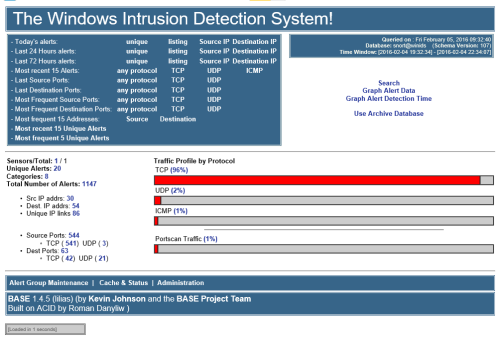
1. Launch the WinIDS Console on the Master Management Server.
2. Monitor the "Sensors/Total" telemetry indicator.
3. A successful link displays "2/2" (or greater). Verify that "$SensorName"
is actively reporting logs to the centralized dashboard.
===============================================================================
TECHNICAL DOCUMENTATION & SUPPORT: http://winsnort.com
===============================================================================
1 download
Updated
Sign in to follow this
Followers
0