


Morpheus
-
Posts
640 -
Joined
-
Last visited
-
Days Won
101


Morpheus's Achievements






-

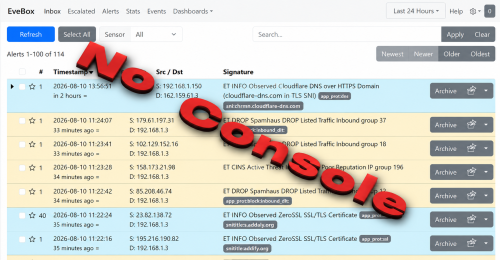
0 downloads
=============================================================================== WinIDS-Suricata v1.0 Deployment Framework – Standalone Sensor Install Copyright © 2026 WinSnort.com | Michael Steele =============================================================================== Operational Overview This package contains an automated, high-performance deployment framework tailored for Suricata with NO console interface on Windows 10/11 and Windows Server (2016–2025) 64-bit environments. Engineered with a completely self-contained footprint, the framework executes a bare-metal setup from start to finish in under 8 minutes and under 2 minutes if the files exist with zero manual dependency hunting. Phase I: Pre-Deployment Specifications Target Environment : Optimized for clean host installations or rapid sensor rollouts. Package Security : This package is password-protected: w1nsn03t.c0m SHA-1 Verification : To ensure file integrity, verify that the SHA-1 hash matches: 1BC4873B6BE7342CFEB68BEDE007C606633ADE51 Archive Integrity : Extract all package contents directly to a dedicated local directory (e.g., D:\Temp). Configuration Note : Ensure suricata.conf is fully configured with your desired parameters prior to running the installer. Execution Rule : Right-click Suricata-WinIDS-Installer.exe and select Run as Administrator. Phase II: Configuration Setup (`suricata.conf`) Locate the suricata.conf file in the local extraction directory, open it with any text editor, and configure the target parameters: $TempDir = "" # Path for temporary installation/download files (e.g., "D:\Temp") $WinIDSRoot = "" # Primary home directory for WinIDS installation (e.g., "D:\WinSuricata") $EnableRestorePoint = $true # Set to $false to skip System Restore point creation Save all changes to suricata.conf, close the editor and you are good to execute the installer. Phase III: Architecture & Execution Engine Automated Pipeline (Sub-8-Minute Deployment) The framework streams and sequences the deployment automatically: Rule Maintenance : Pulls and extracts the latest stable Windows release of Suricata. WinPcap/Npcap Integration : Automatically validates and deploys network packet capture prerequisites required for Windows interface binding. Rule Management : Initializes automated rule-set downloading and compilation (pulling Emerging Threats or custom configurations) straight out of the box. Service Registration : Registers Suricata as native Windows Services configured with automatic recovery flags. Recovery, Resiliency, and System Restore Resume Capability : If a download or dependency asset fails mid-stream due to network interruption, place the required file manually into `$TempDir` and re-run. The framework detects existing valid assets and resumes instantly without overwriting baseline configurations. System Restore Integration : On compatible workstation OS builds, the utility flushes old snapshots, creates a clean pre-installation restore point if none exists, and resets service flags to manual to protect the baseline. System Restore Limitations : This function is exclusively available on Windows Workstation operating systems. Windows Server architectures do not natively support System Restore points; this feature is automatically bypassed during server deployments. Phase IV: Post-Deployment Management & Access Upon completion, the management suite initializes local routing and registers shortcut hooks. Rule Maintenance : Managed via manual updates executed from a Start Menu shortcut. Automatically preserves the initial default rule set during the first run to serve as a reliable baseline for future rollbacks. System Restore : Includes a dedicated System Restore shortcut in the Start Menu designed to completely remove the installation and revert the system back to its original pre-installation state (workstation only). **Note**: A system reboot is recommended, but not required post-installation. A reboot will cleanly refresh path variables and confirm stable Windows Service execution states. =============================================================================== TECHNICAL DOCUMENTATION & SUPPORT: https://winsnort.com =============================================================================== -
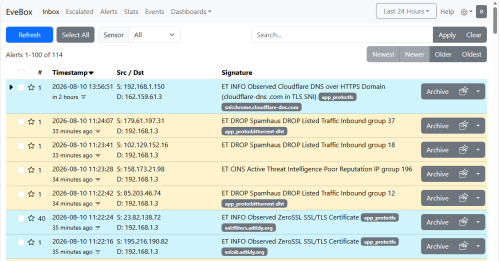
0 downloads
=============================================================================== WinIDS-Suricata v1.0 Deployment Framework – Standalone Sensor Install Copyright © 2026 WinSnort.com | Michael Steele =============================================================================== Operational Overview This package contains an automated, high-performance deployment framework tailored for Suricata combined with EveBox as the native console interface on Windows 10/11 and Windows Server (2016–2025) 64-bit environments. Engineered with a completely self-contained footprint, the framework executes a bare-metal setup from start to finish in under 8 minutes and under 2 minutes if the files exist with zero manual dependency hunting. Phase I: Pre-Deployment Specifications Target Environment : Optimized for clean host installations or rapid sensor rollouts. Package Security : This package is password-protected: w1nsn03t.c0m SHA-1 Verification : To ensure file integrity, verify that the SHA-1 hash matches: 13B507EEC40F2078E2D06847764FB671F5F0391C Archive Integrity : Extract all package contents directly to a dedicated local directory (e.g., D:\Temp). Configuration Note : Ensure suricata.conf is fully configured with your desired parameters prior to running the installer. Execution Rule : Right-click Suricata-WinIDS-Installer.exe and select Run as Administrator. Phase II: Configuration Setup (`suricata.conf`) Locate the suricata.conf file in the local extraction directory, open it with any text editor, and configure the target parameters: $TempDir = "" # Path for temporary installation/download files (e.g., "D:\Temp") $WinIDSRoot = "" # Primary home directory for WinIDS installation (e.g., "D:\WinSuricata") $EnableRestorePoint = $true # Set to $false to skip System Restore point creation Save all changes to suricata.conf, close the editor and you are good to execute the installer. Phase III: Architecture & Execution Engine Automated Pipeline (Sub-8-Minute Deployment) The framework streams and sequences the deployment automatically: Rule Maintenance : Pulls and extracts the latest stable Windows release of Suricata and the standalone EveBox binary (utilizing its high-efficiency embedded SQLite data store). WinPcap/Npcap Integration : Automatically validates and deploys network packet capture prerequisites required for Windows interface binding. Rule Management : Initializes automated rule-set downloading and compilation (pulling Emerging Threats or custom configurations) straight out of the box. Service Registration : Registers both Suricata and EveBox as native Windows Services configured with automatic recovery flags. Recovery, Resiliency, and System Restore Resume Capability : If a download or dependency asset fails mid-stream due to network interruption, place the required file manually into `$TempDir` and re-run. The framework detects existing valid assets and resumes instantly without overwriting baseline configurations. System Restore Integration : On compatible workstation OS builds, the utility flushes old snapshots, creates a clean pre-installation restore point if none exists, and resets service flags to manual to protect the baseline. System Restore Limitations : This function is exclusively available on Windows Workstation operating systems. Windows Server architectures do not natively support System Restore points; this feature is automatically bypassed during server deployments. Phase IV: Post-Deployment Management & Access Upon completion, the management suite initializes local routing and registers shortcut hooks. EveBox Console : Accessible locally via web browser at `http://localhost:5636` or via the desktop shortcut, providing an inbox-style alert review dashboard, real-time telemetry, and event searching. Rule Maintenance : Managed via manual updates executed from a Start Menu shortcut. Automatically preserves the initial default rule set during the first run to serve as a reliable baseline for future rollbacks. System Restore : Includes a dedicated System Restore shortcut in the Start Menu designed to completely remove the installation and revert the system back to its original pre-installation state (workstation only). **Note**: A system reboot is recommended, but not required post-installation. A reboot will cleanly refresh path variables and confirm stable Windows Service execution states. =============================================================================== TECHNICAL DOCUMENTATION & SUPPORT: https://winsnort.com =============================================================================== -
Base Configuration Error
Morpheus replied to jnoute's topic in Discussing Manual Installation for Apache2 with MySQL Logging
You failed to follow the tutorial and made this an install that cannot be supported. Go back and start over following the tutorial and this will work so much better. -
You failed to follow the tutorial and made this an install that cannot be supported. Go back and start over following the tutorial and this will work so much better.
-
You will need to supply more information and what exactly is not working?
-
DB-Maintenance Utility Enhancement
Morpheus posted a topic in Technical Advisories - Auto-Installers
Following requests for enhanced event management, the DB-Maintenance Utility has been updated to include a time-based purge feature. Administrators can now automatically clear database events older than (X) days. Happy WinSnorting... -
This is the execution log output for the Automated Installation Framework of a WinSnort Windows Intrusion Detection System (WinIDS) configured as a remote node sensor. The deployment process is virtually identical for Windows Workstation or Windows Server environments. MySQL-Output.log PGSQL-Output.log
-
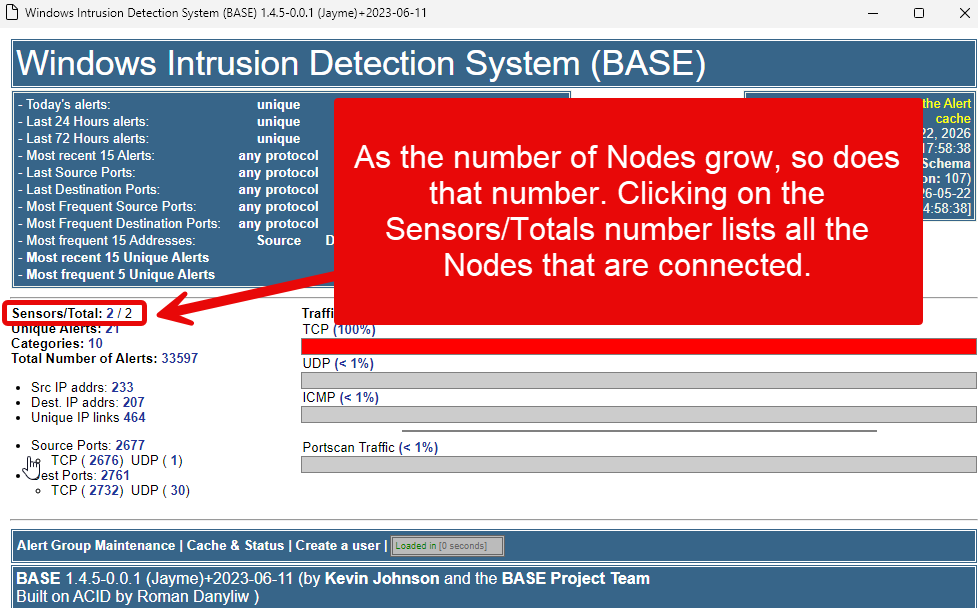
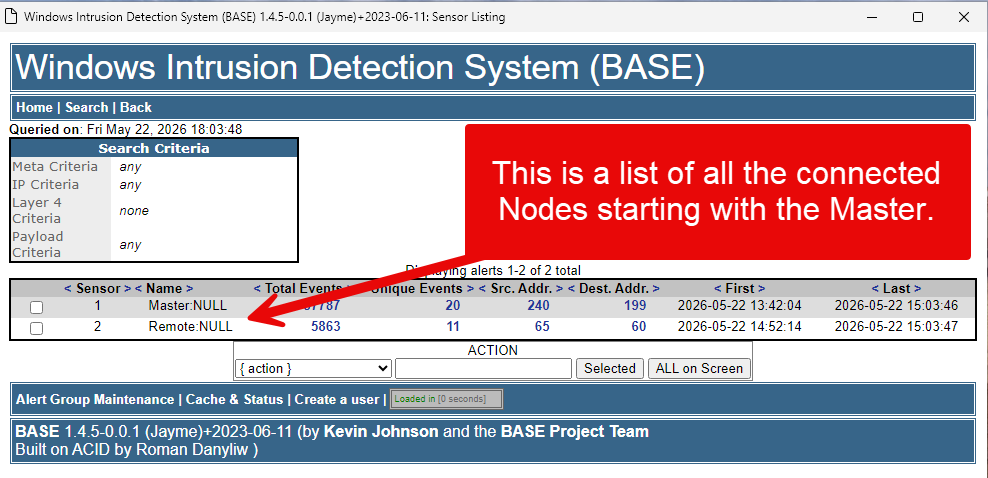
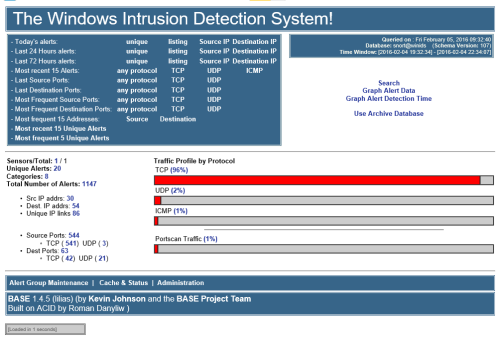
Opening the Master sensor will display the total number of connected nodes. If a node is missing, it simply means it hasn’t connected yet—this process can take a few minutes. (Note: MySQL handles this initial connection noticeably faster than PostgreSQL.)
-
This is the execution log output for the Automated Installation Framework of a WinSnort Windows Intrusion Detection System (WinIDS) configured as a Master/Standalone sensor. The deployment process is virtually identical for Windows Workstation or Windows Server environments, with the exception that Server architecture requires a distinct Internet Information Services (IIS) feature provisioning step. Output.log
-
This is the execution log output for the Automated Installation Framework of a WinSnort Windows Intrusion Detection System (WinIDS) configured as a Master/Standalone sensor. The deployment process is virtually identical for Windows Workstation or Windows Server environments, with the exception that Server architecture requires a distinct Internet Information Services (IIS) feature provisioning step. Output.log
-
This is the execution log output for the Automated Installation Framework of a WinSnort Windows Intrusion Detection System (WinIDS) configured as a Master/Standalone sensor. The deployment process is virtually identical for Windows Workstation or Windows Server environments, with the exception that Server architecture requires a distinct Internet Information Services (IIS) feature provisioning step. Output.log
-
This is the execution log output for the Automated Installation Framework of a WinSnort Windows Intrusion Detection System (WinIDS) configured as a Master/Standalone sensor. The deployment process is virtually identical for Windows Workstation or Windows Server environments, with the exception that Server architecture requires a distinct Internet Information Services (IIS) feature provisioning step. output.log
-
WinSnort.com is a premier resource dedicated to the advancement of network security through the WinIDS (Windows Intrusion Detection System) stack. Our mission is to provide the security community with the tools, documentation, and automation necessary to deploy professional-grade intrusion detection and prevention systems on Windows platforms. At the core of our platform is the WinIDS Automated Deployment Framework, a comprehensive suite designed to streamline the installation and configuration of industry-standard security tools. We focus on the seamless integration of: Snort: The world's most widely deployed IDS/IPS engine. Barnyard2: For efficient spooling and processing of security event data. Database Integration: Optimized configurations for MySQL and PostgreSQL backends. PulledPork: Automated rule management and synchronization. Web Consoles: Professional deployment of Apache2 and IIS environments for real-time monitoring. Our Mission We believe in empowering security administrators and researchers with automated, reliable, and high-performance security solutions. By moving away from complex manual setups, WinSnort allows users to focus on what matters most: identifying threats and securing their network infrastructure. The WinIDS Framework Our latest project, WinIDS v4.1, represents a ground-up rewrite of our deployment scripts, utilizing PowerShell and advanced automation to ensure a "plug-and-play" experience for complex security environments. From local sensor management to remote node initialization, we provide the technical blueprints for a robust defense-in-depth strategy. Community & Innovation Beyond software, WinSnort.com serves as a hub for tutorials, technical documentation, and community support. Whether you are a seasoned systems administrator or a security enthusiast, our resources are crafted to help you master the intricacies of the Snort ecosystem.
-
Morpheus changed their profile photo
-
We are pleased to provide updated guidance on utilizing the PulledPork rule updater for your Windows Intrusion Detection systems. Whether you are managing a standalone sensor or a fleet of remote nodes, following these best practices will help ensure your detection rules remain current and reliable. Deployment Scenarios Standalone Sensors For standalone installations, the updater can be executed directly from the desktop shortcut. Note: While the script may function without elevated permissions, we recommend selecting Run as Administrator to ensure the utility has the necessary access to update system files successfully. Remotely Managed Nodes While the updater is fully compatible with standalone sensors, it is optimized for remotely managed environments. For these deployments, we recommend enabling all three configuration options (Silent Mode, Email Notifications, and Task Scheduling) to ensure seamless, automated maintenance. Recommended Configurations You can optimize the script by adjusting the following variables within the configuration file: Silent Mode ($silent): Set to 1 to mute console output. This reduces overhead and is recommended for remote, automated nodes. Email Notifications ($sendmail): Set to 1 to receive status alerts, requires SMTP setting added. Failsafe Mechanism: If an update fails, the script will automatically roll back to the previous stable ruleset and send a notification detailing the cause of the failure. Scheduling: For instructions on automating your update cycles, please refer to our dedicated tutorial: Scheduling and Updating Windows IDS Rules. Feedback & Continuous Improvement Several fail-safes have been built-in; the process is constantly looking to improve the stability and performance. We welcome your input! If you have any recommendations or encounter issues, please submit your feedback.
-
9 downloads
=============================================================================== WinIDS v4.1 Deployment Framework – Remote Node & Host Conversion Install Guide Copyright © 2026 WinSnort.com | Michael Steele =============================================================================== Operational Overview This toolkit provides the automated framework required to convert a standalone sensor into a Master Host and facilitate the deployment of WinIDS Remote Nodes. This architecture enables decentralized packet inspection paired with centralized database logging. Architectural Prerequisites • Active Instance : A functional Standalone WinIDS Sensor is required. • Node Conversion : This process upgrades a Standalone Sensor to a Master Management Server role and initializes the Remote Node environment. Phase I: Pre-Deployment Specifications • Target Environment : Optimized for clean OS installations. • Archive Integrity : Extract all package contents to a dedicated directory. • Archive Security : w1nsn03t.c0m Phase II: Master Server Provisioning To allow inbound database traffic, the Master Management Server must be provisioned prior to remote node initialization. Ensure you have the Remote Node IP address ready before beginning. Access the $WinIDSRoot\tools directory on the Master Host. Right-click InitializeNode.exe and select Run as Administrator. From the menu options, press the A key to add an IP, and enter the IP address of the remote node at the input prompt. Technical Impact: This utility automates Windows Firewall scoping and configures database permissions for the specified $RemoteIP. Upon completion, the executable will display the configuration details required for the remote node setup. >>> REMOTE NODE CONFIGURATION DETAILS Use the following settings on Remote Node (redacted) ------------------------------------------------------------ [•] Master Host Database Username: (redacted) [•] Master Host Database Password: (redacted) [•] Master Host IP Address : (redacted) [•] MySQL Host Database Port : (redacted) ------------------------------------------------------------ [SUCCESS] Configuration complete. Press any key to return to menu... The values displayed will include the Master Host Database Username, Master Host Password, Master Host IP Address, and MySQL/PostgreSQL Host Database Port. Record these values; they are required for Phases III and IV of this guide. Note: Run this process to add each new remote node. Phase III: Connectivity & Validation Perform these steps on the Remote Node. You will need the Master Host IP and Database Port recorded during Phase II. Note: This step only verifies the connection from the Node to the Host. Navigate to the remote node and access its local extraction directory. Right-click Node2Host.exe, select Run as Administrator, and enter the IP address of the Master Host. Next, it will prompt for the Database port. If using the default port, press Enter to initiate an automated port scan. If using a custom port, type the port number and press Enter. CRITICAL: Connection verification is mandatory. If the handshake fails, troubleshoot the network path before proceeding to Phase IV. Phase IV: Remote Sensor Deployment Locate the config.conf file in the remote node extraction directory, open it with a text editor (such as Notepad), and configure the following variables: $TempDir = "" # Path for temporary installation/download files (e.g., "D:\files") $WinIDSRoot = "" # Primary home directory for WinIDS installation (e.g., "D:\home") $Oinkcode = "" # Your 40-character Snort.org Oinkcode for rule updates $SensorName = "" # Unique name for this node sensor (e.g., "NodeName") $EnableAllRules = $true # Set to $false to disable rule testing and high-volume logging $EnableRestorePoint = $true # Set to $false to skip System Restore point creation Input the SnortUser and SnortPass acquired in Phase II. This establishes the connection between Barnyard2 and the host database. $SnortUser = "" # Master Host ALERT Database Username $SnortPass = "" # Master Host ALERT Database Password Input the MasterHostIP and MasterHostPort acquired in Phase II. This establishes the network link between the remote node and the master host. $MasterHostIP = "" # Master Host IP Address (e.g., "192.168.1.50") $MasterHostPort = "" # Master Host Database Port (e.g., "3306") Save all changes to config.conf and close the editor. Right-click Installer.exe and select Run as Administrator to begin the installation. Deployment Duration Estimates Completion times vary based on the selected database engine and host operating system. The following estimates assume standard network throughput and hardware resource availability: Workstation (standalone or node deployments): ~15 minutes Server host deployments: ~40 minutes Performance is directly influenced by available system resources and network bandwidth. Recovery and Resiliency Logic The WinIDS framework is designed with automated resume capability. In the event of a package acquisition failure, manually download the required asset to your defined $TempDir and re-initialize the installer. The framework will automatically detect the local file and resume deployment. Important: Do not terminate the installer during active system modifications or registry updates to prevent system corruption. System Restore Operations In workstation environments, when EnableRestorePoint is active, the installer generates a system restore point prior to setup. This process initializes the required snapshot services, clears existing restore points, and creates a fresh baseline snapshot before cycling the services back to manual. This specific sequence ensures the first-run pre-installation snapshot remains protected from automatic purging. If a valid first-run snapshot is already present—often the result of a previous removal via the RestorePoint utility—the installer will bypass the creation step to preserve the original baseline for the new installation. System Recovery Process The RestorePoint utility relies on the initial first-run snapshot to execute a rollback. If this snapshot is detected, the utility will revert the system to its original pre-installation state. If the snapshot is missing, the process will automatically terminate to prevent system instability. Without a valid snapshot, a clean rollback cannot be performed. In this scenario, you must manually resolve the conflict, restore from a full system backup, or initiate a fresh installation. Note that while the recovery process leaves $WinIDSRoot and $TempDir untouched, performing a new installation will permanently delete all data within the $WinIDSRoot directory. Data Integrity The System Restore feature is intended for configuration recovery and is not a replacement for a comprehensive backup solution. System Restore services are set to manual and toggled as needed. Windows Restore Points are transient and may be purged during routine maintenance cycles if those services are running. Environmental Constraints & Best Practices Server Deployments: Windows Server architectures do not natively support System Restore points. This feature is automatically bypassed during server OS deployments. PulledPork Rule Maintenance The original PulledPork by Shirkdog is housed within a sophisticated wrapper, accessible via the WinSnort Start Menu. While the utility is designed for out-of-the-box functionality with no manual configuration required, the wrapper offers a highly verbose interface with integrated system checks. Every update attempt is documented in the PulledPork log folder. To maintain system stability, the utility automatically rolls back to the last known-good rule set if an update fails. The Rule Updater includes a built-in scheduler with configurable intervals ranging from 15 to 60 minutes. It supports automated retention of successful updates and SMTP email notifications. While Silent Mode is available for remote or unmanaged sensors, the updater defaults to a verbose display if launched manually from the desktop while in Silent Mode. If executed in Silent Mode without SMTP, the system continues to capture errors and failures within the local log files. Phase V: Post-Deployment Management Upon successful completion, the WinIDS Management Suite will be accessible via Start Menu > WinSnort. Core utilities include: • Rules Updater : PulledPork-driven rule-set synchronization. • System Restore : System Restore Point (SRP) utility (workstation only). Although a system reboot is not strictly mandatory, it is recommended to ensure all environment variables are refreshed. Please note that the WinSnort Start Menu group may not appear in the Start Menu hierarchy until a system restart has been completed. Phase VI: Post-Deployment Verification Management Server Validation: Launch the WinIDS Console on the Master Management Server. Monitor the Sensors/Total telemetry indicator. A successful link displays 2/2 (or greater). Verify that $SensorName is actively reporting logs to the centralized dashboard. =============================================================================== TECHNICAL DOCUMENTATION & SUPPORT: https://winsnort.com ===============================================================================