==============================================================
              WinIDS v4.0 Deployment Framework
  EveBox + OpenSearch + OpenSSL Console — Enterprise Edition
                      (Add-On Package)
                     Installation Guide
        Copyright © 2026 WinSnort.com | Michael Steele
==============================================================

This package provides an automated deployment framework for adding the EveBox Web Console, OpenSearch Analytics Engine, and OpenSSL PKI certificate generation to an existing WinIDS / Suricata installation.

    • EveBox Web Interface (Port 5636)
    • OpenSearch Enterprise Analytics Engine
    • OpenSSL Automated CA & TLS Certificate Generation
    • HTTPS-Secured Live EVE Ingestion Pipeline
    • OpenSearch PKI Validation & Recovery Utility

======================================
PHASE I: PRE-DEPLOYMENT SPECIFICATIONS
======================================

TARGET ENVIRONMENT
    • Windows 10 / Windows 11 (64-bit) or Windows Server (2016–2025) (64-bit)
    • Existing active WinIDS / Suricata installation (generating eve.json)
    • Local Administrator privileges required
    • Active Internet connection recommended (for initial binary retrieval)

PACKAGE SECURITY & INTEGRITY
    • Archive Password : w1nsn03t.c0m
    • SHA-1 Hash       : D90A709E593AEDE8220B229200459CD5A3B708B6

DEPLOYMENT MODEL
EveBox Console Add-On backed by OpenSearch enterprise search and OpenSSL TLS encryption to ingest, index, and secure Suricata event telemetry.

ARCHIVE HANDLING
    • Extract the full ZIP archive before running setup. DO NOT run installers directly from inside the ZIP file.
    • Preserve all directory structures contained within the archive.

IMPORTANT NOTICE
This package configures background Windows Services, issues local SSL/TLS certificates, and updates firewall rules. Ensure your core Suricata engine is already installed and actively producing `eve.json` logs before proceeding.

======================================
PHASE II: PACKAGE CONTENTS
======================================

EveBox-OpenSearch-Installer.exe
Primary automated setup utility for EveBox, OpenSearch, and OpenSSL.

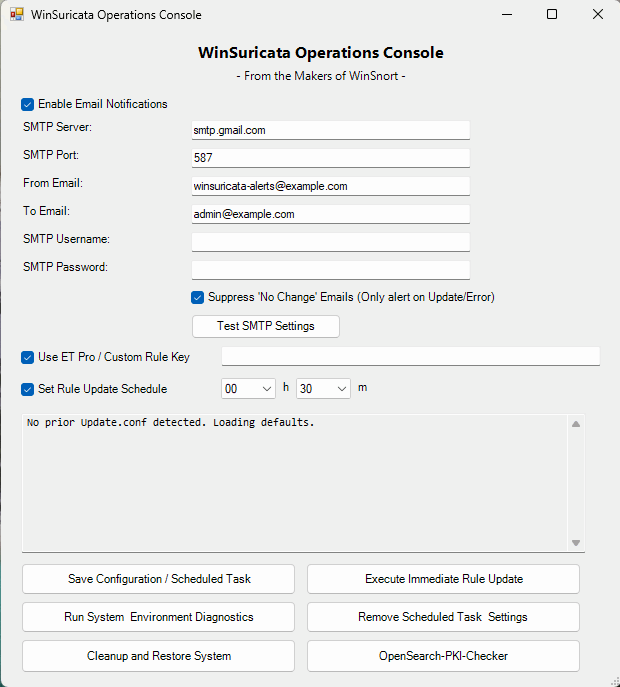
WinSuricata-OpenSearch-PKI-Check.exe
OpenSearch PKI and security validation and recovery utility.

README-INSTALL.txt
Complete step-by-step installation instructions and technical reference guide.

======================================
PHASE III: INSTALLATION PROCEDURE
======================================

STEP 1: EXTRACT PACKAGE
Extract the complete production ZIP archive to a dedicated folder.

Example: D:\Staging\EveBox-OpenSearch
(Do not rename or remove files prior to setup.)

STEP 2: RUN PRIMARY EVEBOX OPENSEARCH INSTALLER
Right-click 'EveBox-OpenSearch-Installer.exe' -> Select "Run as administrator". The framework will deploy OpenSearch, configure Java heap parameters, and set up the EveBox service automatically.

======================================
PHASE IV: ARCHITECTURE OVERVIEW & RESILIENCY
======================================

AUTOMATED PIPELINE
    • SEARCH ENGINE INITIALIZATION: Provisions OpenSearch analytics cluster optimized for high-volume event indexing and rapid querying out of the box.
    • PKI CERTIFICATE GENERATION  : Leverages OpenSSL to generate private CAs, issue TLS certificates, and enforce encrypted HTTPS transport across nodes.
    • PKI HEALTH VALIDATION       : WinSuricata-OpenSearch-PKI-Check verifies required CA, node, administrative certificate, and private key assets.
    • SECURITY CONFIGURATION      : Validates and reapplies the OpenSearch TLS/security configuration when PKI assets require regeneration or reinitialization.
    • SERVICE REGISTRATION        : Registers OpenSearch and EveBox as native Windows Services via NSSM with automatic recovery and restart flags.
    • EVE INGESTION PIPELINE      : Establishes live monitoring of the Suricata `eve.json` output stream to stream alert telemetry into OpenSearch indexes.

COMPONENT STACK
    • EveBox    : Web-based alert triage, threat analysis, and search console.
    • OpenSearch: Enterprise distributed search engine for log indexing and analytics.
    • OpenSSL   : Cryptographic toolkit providing TLS encryption and local certificate generation.
    • PKI Check : WinSuricata-OpenSearch-PKI-Check provides certificate health validation, regeneration, and OpenSearch security configuration recovery.
    • EVE JSON  : Structured event log source stream generated by Suricata.

RECOVERY & SYSTEM RESTORE
    • RESUME CAPABILITY: If a dependency download fails mid-stream, place the asset manually into $TempDir and re-run. The installer detects valid files and resumes.

    • PKI RECOVERY: If OpenSearch certificate assets are missing or become invalid after deployment, execute WinSuricata-OpenSearch-PKI-Check.ps1 as Administrator. The utility validates the PKI environment and can regenerate required certificate and key assets before restoring the OpenSearch TLS/security configuration.

======================================
PHASE V: POST-DEPLOYMENT MANAGEMENT & ACCESS
======================================

PKI & OPENSEARCH SECURITY MAINTENANCE
    • WinSuricata-OpenSearch-PKI-Check.ps1 may be executed independently after deployment.
    • Run the utility as Administrator when certificate validation, PKI repair, or OpenSearch security reconfiguration is required.
    • The utility verifies the OpenSSL installation and required Root CA, node, and administrative certificate assets.
    • Missing PKI components can be regenerated automatically using the existing WinSuricata OpenSSL installation.
    • Node and administrative private keys are converted to the PKCS#8 format required by the OpenSearch security configuration.
    • OpenSearch `opensearch.yml` is updated with the required TLS/SSL security directives as required.
    • The utility provides a recovery path without requiring a complete EveBox/OpenSearch reinstallation.

CONSOLE ACCESS
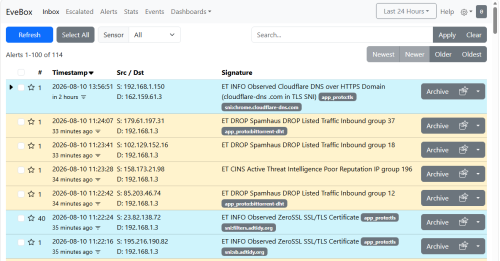
    • Browser access: `http://localhost:5636` (or via the generated Desktop/Start Menu shortcut).
    • Provides an inbox-style alert triage dashboard, event searching, and timeline telemetry.

SYSTEM REBOOT
    • Recommended (optional). Refreshes environment PATH variables and verifies the OpenSearch and EveBox Windows Service auto-start states.

======================================
PHASE VI: TROUBLESHOOTING
======================================

1. DEPENDENCY DOWNLOAD FAILS

    • Review installer console output and log files.
    • Verify Internet connectivity and check write access on $TempDir.
    • Re-run installer (valid cached downloads will be reused).

2. OPENSEARCH FAILS TO START

    • Verify OpenSearch service status in `services.msc`.
    • Check SSL certificate file paths and system access permissions in config directories.
    • Ensure system RAM meets minimum Java Virtual Machine (JVM) heap requirements.
    • Run 'WinSuricata-OpenSearch-PKI-Check.ps1' as Administrator to verify the OpenSearch PKI and TLS configuration.

3. SSL CERTIFICATE / PKI ERROR

    • Verify the OpenSSL binaries are present in the framework OpenSSL directory.
    • Run 'WinSuricata-OpenSearch-PKI-Check.ps1' as Administrator.
    • The utility will check the Root CA, node certificate, administrative certificate, private keys, and PKCS#8 key assets.
    • Missing certificate assets can be regenerated automatically.
    • The OpenSearch TLS/security configuration will be reapplied as required.
    • After completion, verify that the WinIDS-OpenSearch service is running and that HTTPS access to OpenSearch on port 9200 is available.

4. EVEBOX CONSOLE UNREACHABLE

    • Confirm the EveBox service is active in `services.msc`.
    • Verify local port binding status at `http://localhost:5636`.
    • Check Windows Firewall settings for blocked local endpoints.

5. EVEBOX DISPLAYS NO EVENTS

    • Confirm core Suricata is actively writing fresh data to `eve.json`.
    • Ensure the OpenSearch service is running and healthy over HTTPS.
    • Check firewall rules for local service communication blocks.

======================================
FINAL DEPLOYMENT CHECKLIST
======================================

[ ] SHA-1 hash verified before extraction
[ ] Archive extracted to a local directory using archive password
[ ] 'suricata.conf' updated with correct installation paths
[ ] Primary add-on installer executed with Administrator privileges
[ ] WinSuricata-OpenSearch-PKI-Check.ps1 included in deployment package
[ ] PKI validation completed and required certificates issued
[ ] SSL/TLS configuration verified
[ ] OpenSearch security configuration verified
[ ] OpenSearch service active and listening over secure HTTPS
[ ] EveBox web console accessible at http://localhost:5636
[ ] EveBox ingesting live alerts from Suricata `eve.json` into OpenSearch
[ ] Desktop and Start Menu shortcuts generated
[ ] System reboot performed (recommended)

======================================
TECHNICAL DOCUMENTATION & SUPPORT
======================================
WinSnort.com
Website: https://winsnort.com
Maintainer: Michael Steele