===============================================================================
                       WinIDS v4.0 Deployment Framework
             WinSuricata Sensor — Engine Edition (Headless / No Console)
                              Installation Guide
                 Copyright © 2026 WinSnort.com | Michael Steele
===============================================================================

ABOUT THIS FILE
-------------------------------------------------------------------------------

This package contains an automated Windows Intrusion Detection and Security
Monitoring deployment framework built around:

    • Suricata IDS/IPS Engine
    • Npcap Packet Capture Driver
    • Native suricata-update Engine via Cygwin Subsystem
    • WinSuricata Operations Console (Unified Management, Resiliency & Real-Time Monitoring Hub)
    • System Cleanup and Recovery Utilities

The framework automates installation, configuration, driver binding, and
service integration for a high-performance, headless WinIDS sensor node.

===============================================================================
PHASE I: PRE-DEPLOYMENT SPECIFICATIONS
===============================================================================

TARGET ENVIRONMENT
    • Windows 10 / Windows 11 (64-bit) or Windows Server (2016–2025) (64-bit)
    • Local Administrator privileges required
    • Active Internet connection recommended (for dependency downloads)

DEPLOYMENT MODEL
    Standalone, high-performance Windows sensor running pure Suricata IDS/IPS,
    managed centrally via the built-in WinSuricata Operations Console.

PACKAGE SECURITY & INTEGRITY
    • Archive Password : w1nsn03t.c0m
    • SHA-1 Hash       : 5A97967AB4B1D31C376B58EC5EA49999D3A01D16

ARCHIVE HANDLING
    • Extract the full ZIP archive before running setups. DO NOT run
      installers directly from inside the ZIP file.
    • Preserve all directory structures contained within the archive.

IMPORTANT NOTICE
    This installation configures Windows services, packet capture drivers, firewall
    rules, and optionally system restore points. Always verify configuration parameters
    prior to execution.

===============================================================================
PHASE II: PACKAGE CONTENTS
===============================================================================

  WinSuricata-Headless-Installer.exe
      Primary WinIDS automated setup and deployment utility.

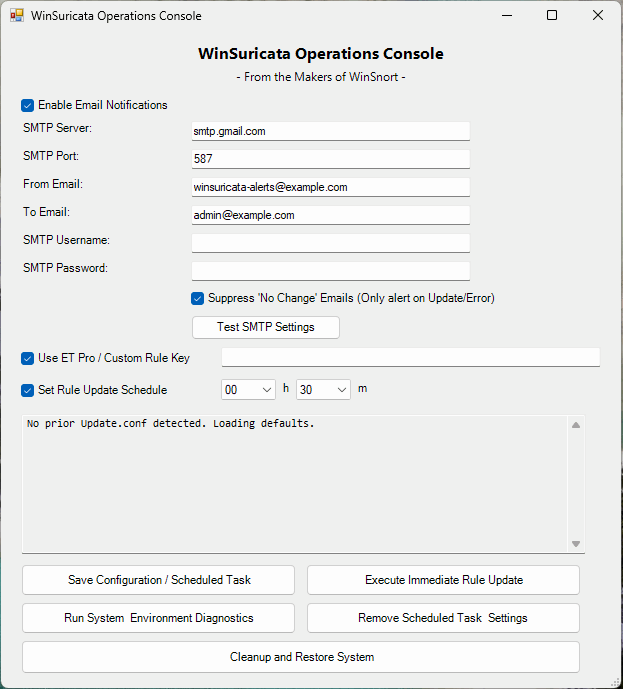
  WinSuricata-Operations-Console.exe
      Unified management interface handling real-time service controls, granular
      SMTP notification configurations, Suricata Pro key integration, automated
      and manual rule updates, health diagnostics, and real-time log monitoring.

  WinSuricata-Silent-Rules-Updater.exe
      Under-the-hood background executable invoked by the Operations Console for
      automated rule updates, syntax validation, and rollback routines.

  WinSuricata-Cleanup-Restore.exe
      WinIDS cleanup, uninstall, and disaster recovery utility.

  suricata.conf
      Core deployment configuration file containing target path variables.

  winids.ico
      Application icon file for desktop and Start Menu shortcuts.

===============================================================================
PHASE III: INSTALLATION PROCEDURE
===============================================================================

STEP 1: EXTRACT PACKAGE
    Extract the complete production ZIP archive to a dedicated folder.

    Example: D:\Staging\WinIDS-Install
    (Do not rename or remove files prior to setup.)

STEP 2: REVIEW CONFIGURATION
    Open 'suricata.conf' in Notepad and adjust the required path variables:

    $WinIDSRoot         = "D:\WinSuricata"  # Primary installation directory
    $TempDir            = "D:\Temp"         # Temporary download directory
    $EnableRestorePoint = 1                 # Set to 0 to skip System Restore

STEP 3: RUN PRIMARY INSTALLER
    Right-click 'WinSuricata-Headless-Installer.exe' -> Select "Run as administrator"
    The framework will execute a bare-metal setup in under 4 minutes.

===============================================================================
PHASE IV: ARCHITECTURE OVERVIEW & RESILIENCY
===============================================================================

AUTOMATED PIPELINE
    • PACKET CAPTURE    : Validates and deploys Npcap drivers required for
      Windows network interface binding and promiscuous packet sniffing.
    • CORE ENGINE       : Streams and extracts the latest stable 64-bit
      Windows release of Suricata binaries.
    • RULE MANAGEMENT   : Deploys a targeted Cygwin subsystem environment on initial
      execution to run the native "suricata-update" utility seamlessly under Windows.
    • SERVICE REGISTRY  : Registers Suricata as a native Windows Service via
      NSSM with automatic recovery flags.

COMPONENT STACK
    • Suricata          : Network IDS engine handling packet inspection and alert generation.
    • Npcap             : Packet capture library allowing Suricata to sniff traffic on Windows interfaces.
    • Cygwin Engine     : Posix compatibility runtime hosting the official native "suricata-update" tool.
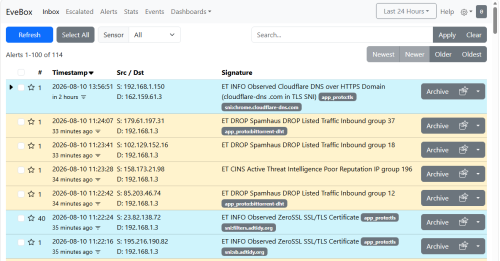
    • EVE JSON          : Structured event data output generated by Suricata for downstream parsing.
    • Python            : Automation engine for managing setup scripts and log processing.
    • NSSM              : Service wrapper that runs Suricata background services on Windows.
    • Git               : Version control utility used for pulling rule updates and framework code.

WINDSURICATA OPERATIONS CONSOLE ARCHITECTURE & RESILIENCY
    The WinSuricata Operations Console (`WinSuricata-Operations-Console.exe`) serves as
    the central management hub, bringing enterprise-grade control and resiliency:
    • UNIFIED SERVICE CONTROL: Start, stop, restart, and monitor the live status of the
      Suricata Windows Service directly from an interactive graphical dashboard.
    • SMTP NOTIFICATION      : Configure granular email alerts for Success, Failure, and
      No Change states with global toggles and an instant Test SMTP button.
    • SURICATA PRO KEY       : Directly input and manage your Suricata Pro key inside the
      GUI for seamless subscription rule downloads.
    • RULE MANAGEMENT        : Fully integrates native "suricata-update" processes with
      all standard operational parameters and automated scheduled task options.
    • SCHEDULED AUTOMATION   : Toggle and configure automated scheduled tasks for rule updates
      (operating on 15-minute intervals plus randomized offsets) directly from the interface.
    • INTELLIGENT HASH       : Calculates SHA-256 baselines of remote/compiled rule sets
      and skips execution if no new rules are published.
    • PRE-UPDATE BACKUPS     : Automatically creates a verified snapshot of active rules
      prior to applying updates.
    • VALIDATION & ROLLBACK  : Tests newly compiled rules against "suricata.exe" engine
      syntax before loading. If validation fails, it restores the previous working
      rule set automatically and maintains service uptime.
    • REAL-TIME LOG AUDITING : Features a live status window displaying detailed feedback
      as actions occur, appending rule update deltas, SHA baselines, and rollbacks to logs.

RECOVERY & SYSTEM RESTORE
    • RESUME CAPABILITY: If a download fails mid-stream, place the asset manually
      into $TempDir and re-run. The framework detects cached files and resumes instantly.
    • SYSTEM RESTORE   : Creates a clean pre-installation restore point on Workstations
      (automatically bypassed on Windows Server OS).

===============================================================================
PHASE V: POST-DEPLOYMENT MANAGEMENT & ACCESS
===============================================================================

SYSTEM RESTORE
    • Access via the Start Menu shortcut: 'System Restore'.
    • Performs a bare-metal restore for Workstations only (Server OS unsupported).

OPERATIONS & RULE MAINTENANCE
    • Access via the Start Menu shortcut: 'WinSuricata Operations Console'.
    • Provides a centralized interface for manual/scheduled rule updates, service control,
      health checks, and log monitoring on demand.
    • Cygwin and python/pip dependencies are installed automatically on initial setup.

SYSTEM REBOOT
    • Recommended (optional). Refreshes environment PATH variables and verifies
      Windows Service auto-start states.

===============================================================================
PHASE VI: TROUBLESHOOTING
===============================================================================

1. DEPENDENCY DOWNLOAD FAILS
    - Review installer console output and log files.
    - Verify Internet connectivity and check write access on $TempDir.
    - Re-run installer (valid cached downloads will be reused).

2. SURICATA SERVICE FAILS TO START
    - Confirm driver initialization by verifying Npcap binding state.
    - Run "suricata.exe -c suricata.yaml -T" from command prompt to test syntax.
    - Check Windows Event Viewer under Application logs for crash events.

3. RULE UPDATE ROLLBACK OR FAILURE
    - Review logs via the Operations Console or check "$LogsPath\RulesUpdate.log".
    - Verify network connectivity to threat intelligence providers.
    - Test rule syntax manually via engine validation commands.

4. NO NETWORK TRAFFIC DETECTED
    - Verify interface GUID or index numbers inside the deployed "suricata.yaml".
    - Ensure the correct network interface is selected for sniffing mode.

===============================================================================
FINAL DEPLOYMENT CHECKLIST
===============================================================================
[ ] SHA-1 hash verified before extraction
[ ] Archive extracted to a local directory using password
[ ] 'suricata.conf' updated with correct installation paths
[ ] Primary installer executed with Administrator privileges
[ ] Packet capture driver (Npcap) verified
[ ] Suricata engine running as a registered Windows Service
[ ] Start Menu shortcuts verified ('WinSuricata Operations Console' launched for initial check)
[ ] Desktop and Start Menu shortcuts generated
[ ] System reboot performed (recommended)

===============================================================================
TECHNICAL DOCUMENTATION & SUPPORT
===============================================================================
WinSnort.com
Website: https://winsnort.com
Maintainer: Michael Steele
===============================================================================