

About This File
===============================================================================
WinIDS v2.6 Deployment Framework
Suricata + EveBox + OpenSearch + SSL/TLS
Installation Guide
Copyright © 2026 WinSnort.com | Michael Steele
===============================================================================
ABOUT THIS FILE
-------------------------------------------------------------------------------
This package contains an automated Windows Intrusion Detection and Security Monitoring deployment framework
built around:
• Suricata Engine
• EveBox Console
• OpenSearch Analytics
• OpenSearch SSL/TLS Encryption
• Automated Certificate Generation
• Suricata Rule Management
• System Cleanup and Recovery Utilities
The framework automates installation, configuration, and service integration for the complete WinIDS security
stack while minimizing manual post-setup tasks.
===============================================================================
PHASE I: PRE-DEPLOYMENT SPECIFICATIONS
===============================================================================
TARGET ENVIRONMENT
• Windows 10 / Windows 11 (64-bit) or supported Windows Server (64-bit)
• Local Administrator privileges required
• Active Internet connection recommended (for dependency downloads)
DEPLOYMENT MODEL
Windows sensor running Suricata with local EveBox and OpenSearch components.
PACKAGE SECURITY & INTEGRITY
• Archive Password : w1nsn03t.c0m
• SHA-1 Hash : 592E6E3039BA2A1D9067F81D971F222546D45EB1
ARCHIVE HANDLING
• Extract the full ZIP archive before running setups. DO NOT run installers directly from inside the ZIP file.
• Preserve all directory structures contained within the archive.
IMPORTANT NOTICE
This installation configures system services, firewall rules, registry entries, and security certificates.
Always perform a complete system backup prior to production deployment.
===============================================================================
PHASE II: PACKAGE CONTENTS
===============================================================================
Suricata-WinIDS-Installer.exe
Primary WinIDS setup and deployment utility.
Suricata-WinIDS-Console-SSL.exe
OpenSearch SSL/TLS certificate and HTTPS configuration utility.
Suricata-Cleanup-Restore.exe
WinIDS cleanup, uninstall, and disaster recovery utility.
Suricata-Rules-Updater.ps1
Automated Suricata rule update and maintenance script.
suricata.conf
Core deployment configuration file.
winids.ico
Application icon file for shortcuts.
===============================================================================
PHASE III: INSTALLATION PROCEDURE
===============================================================================
STEP 1: EXTRACT PACKAGE
Extract the complete production ZIP archive to a dedicated folder using the archive password: w1nsn03t.c0m
Example: D:\WinIDS-Install
(Do not rename or remove files prior to setup.)
STEP 2: REVIEW CONFIGURATION
Open 'suricata.conf' in Notepad and adjust the required path variables:
$WinIDSRoot = "" # Main installation folder (e.g., "D:\WinSuricata")
$TempDir = "" # Downloads/Temporary folder (e.g., "D:\Temp")
STEP 3: RUN PRIMARY INSTALLER
Right-click 'Suricata-WinIDS-Installer.exe' -> Select "Run as administrator"
The setup will check prerequisites and deploy core components.
STEP 4: RUN SSL/TLS CONFIGURATION
After the primary installer finishes:
Right-click 'Suricata-WinIDS-Console-SSL.exe' -> Select "Run as administrator"
This script generates CA credentials, issues certificates, and configures
OpenSearch HTTPS endpoints. Do not interrupt during processing.
===============================================================================
PHASE IV: ARCHITECTURE OVERVIEW & MAINTENANCE
===============================================================================
COMPONENT STACK
• SURICATA: Network IDS engine handling packet inspection and alerts.
• EVE JSON: Structured event data output generated by Suricata.
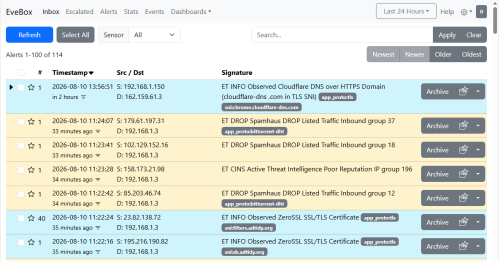
• EVEBOX: Web-based interface for managing and analyzing events.
• OPENSEARCH: Backend search engine used to store and query security data.
• SSL/TLS: Secures OpenSearch traffic via HTTPS encryption.
RULE UPDATES
Run 'Suricata-Rules-Updater.ps1' regularly to update threat signatures.
The script backs up rules, syncs updates, verifies syntax, and reloads the
Suricata service automatically.
CLEANUP & RECOVERY
Use 'Suricata-Cleanup-Restore.exe' as Administrator to reset or remove the installation. System restore points
created by the installer serve as configuration rollbacks only and do not replace full system backups.
===============================================================================
PHASE V: TROUBLESHOOTING
===============================================================================
1. DEPENDENCY DOWNLOAD FAILS
- Review installer console output and log files.
- Verify Internet connectivity and check write access on $TempDir.
- Re-run installer (valid cached downloads will be reused).
2. OPENSEARCH FAILS TO START
- Check OpenSearch service status and system logs.
- Verify SSL certificate paths and file access permissions.
- Ensure required networking ports are free.
3. EVEBOX DISPLAYS NO EVENTS
- Confirm Suricata is actively writing to 'eve.json'.
- Ensure OpenSearch service is running and healthy.
- Check firewall settings for local communication blocks.
===============================================================================
FINAL DEPLOYMENT CHECKLIST
===============================================================================
[ ] SHA-1 hash verified before extraction
[ ] Archive extracted to a dedicated folder using password
[ ] 'suricata.conf' updated with correct paths
[ ] Primary installer executed as Administrator
[ ] Suricata service running and rules loaded
[ ] 'eve.json' actively generating events
[ ] SSL/TLS script executed successfully
[ ] OpenSearch service active over HTTPS
[ ] EveBox web console accessible and receiving events
[ ] Windows Firewall rules confirmed
[ ] Rule updater script tested
[ ] System backup confirmed
===============================================================================
TECHNICAL DOCUMENTATION & SUPPORT
===============================================================================
WinSnort.com
Website: https://winsnort.com
Maintainer: Michael Steele
===============================================================================